
Dola AI Image to Video: Turn Any Photo Into a Video
Upload a photo and say how it should move. Seedance 2.5, the ByteDance model the Dola app makes its videos with, animates your picture into a 5–30-second clip with sound, starting from the exact photo you uploaded. In your browser, in any country, with no watermark.
- Free credits to try
- Your photo is the first frame
- No watermark
- Works in the US
Start with your photo. Drop it onto the box below or press Attach, then write only the movement you want.
Sexually explicit (NSFW) content is strictly prohibited.
Dolai is an independent video generator. It is not affiliated with, endorsed by or connected to Dola or ByteDance. Dola is a trademark of its owner.
One photo, one motion prompt, one clip
This rider started as a still image. Seedance 2.5 got the picture as its first frame and a prompt that describes only the movement.
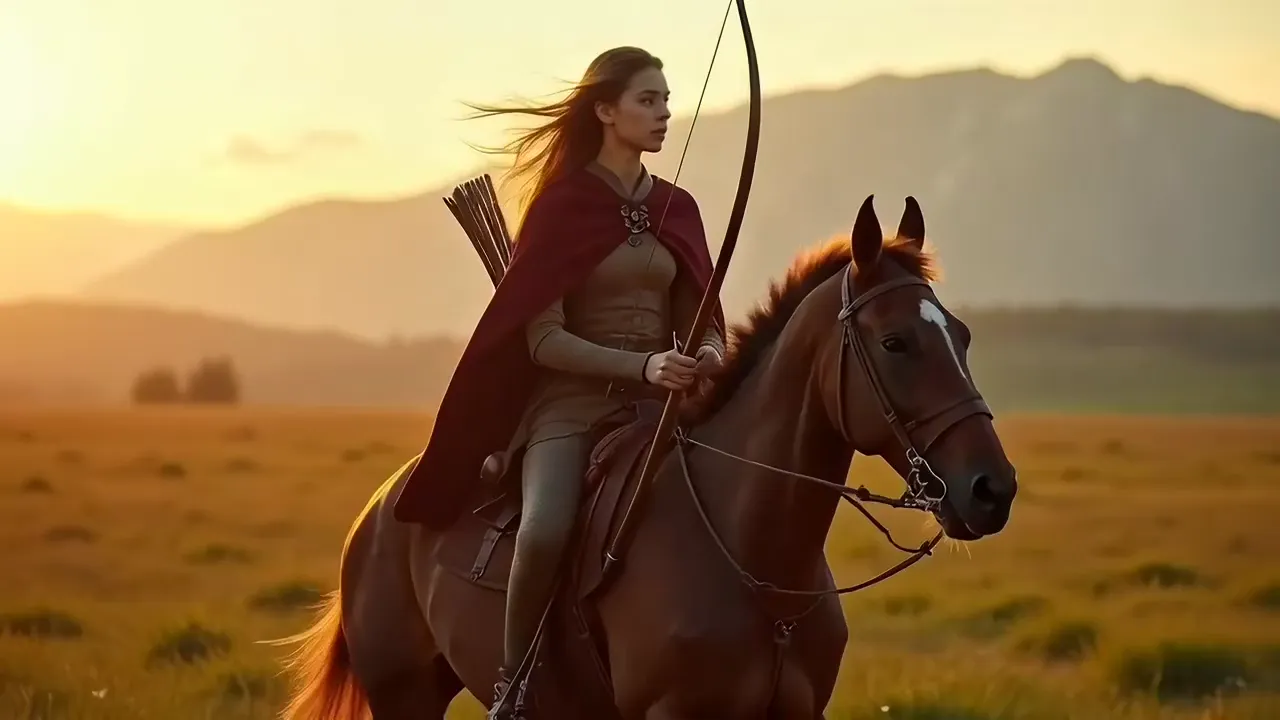 The photo
The prompt
Animate this photo: the rider gallops across the grassland, draws the bow and releases an arrow, the horse's mane and her cloak whip in the wind, dust kicks up behind. Keep her face and outfit exactly as in the photo. Tracking shot, cinematic.
What is Dola AI image to video?
Dola AI is the assistant app from ByteDance, the company behind TikTok; it used to be called Cici. One of its most used features is image to video: you give it a photo, Seedance, ByteDance’s video model, takes it as the starting point, and the picture begins to move. People use it on selfies, pets, product shots and old family photos, and they like it because the clip stays close to the photo instead of redrawing it.
The app has its catches. Dola is not offered in every country, and many people in the United States find it blocked. Free use is a small daily allowance, the clips carry a “Dola AI” mark, and users report that photos of real people are limited to videos “featuring yourself”, so a photo of a parent or a friend can be turned away.
Dolai is a separate, independent web tool that does the image-to-video part with the same Seedance 2.5. You upload the photo here, it becomes the first frame, and you get a 5–30-second clip with sound and no watermark, on a laptop, a PC or a phone, wherever you are.
How to turn a photo into a video
Dola image to video takes four steps here, and only the second one needs any thought.
- 1
Upload your photo
Drop it onto the box or press Attach. A sharp picture with the subject clearly in view works best. It becomes the first frame of the clip.
- 2
Describe the movement
Write what moves and how: “he looks up from the book and laughs, the camera slowly pushes in”. There is no need to describe what is already in the photo.
- 3
Pick length and quality
Choose 5 to 30 seconds and a resolution. The clip keeps the shape of your photo, so crop it to 9:16 first if it is for TikTok or Reels.
- 4
Generate and download
Press Turn photo into video. The clip is ready in a few minutes, is saved to your history and downloads as an MP4 with no watermark.
Prompt tips: describe the motion, not the photo
The model can already see your photo. Words spent describing it either repeat what is there or ask for something slightly different, and that is when faces and products start to drift. Spend them on movement.
Describes the photo
A beautiful woman with long brown hair in a red dress standing in a garden at sunset.
Describes the motion
She turns toward the camera and smiles, a light breeze moves her hair and dress, petals drift past. Slow push-in. Keep her face exactly as in the photo.
Lead with the action
Say what the subject does: turns, smiles, walks forward, pours, wags its tail.
One main action per clip
One clear movement looks natural. Three movements in five seconds look rushed and pull the face out of shape.
Add a camera move
Slow push-in, orbit, handheld or a locked-off tripod. A camera move makes even a still subject feel alive.
Say what must not change
“Keep her face and outfit exactly as in the photo” or “the label stays sharp and readable” tells the model what to hold on to.
Let the scene move too
Wind in the hair, steam rising, leaves falling, light flickering: small movements around the subject make the clip feel real.
Name the sound
The clip comes with its own sound. Mention it when it matters: waves, a café murmur, a dog’s bark.
Dola AI photo to video ideas
Each idea comes with a motion-only prompt. Press Use this prompt, add your own photo and generate.
One product photo into an ad
A single packshot becomes a short commercial: light sweeps across it, droplets fall, the camera pushes in. A launch clip without a studio.
Show the prompt
Slow cinematic push-in on the product. Soft light sweeps across it from left to right, a few water droplets fall around it in slow motion, gentle reflections move over the surface. The product, its shape and its label stay exactly as in the photo.
Portraits and selfies
A turn of the head, a smile, hair moving in the wind. Keep it to one gesture and the face stays yours.
Show the prompt
The person slowly turns their head toward the camera and smiles, a light breeze moves their hair. Subtle handheld camera, natural light. Keep the face, hair and outfit exactly as in the photo.
Pets
A head tilt, ears up, a tail wag. Pet photos are some of the most shared photo-to-video clips.
Show the prompt
The dog tilts its head, perks up its ears and wags its tail, then gives one short happy bark. Static camera at eye level, soft natural light. Keep its fur colour and markings exactly as in the photo.
Old family photos
A blink, a soft smile and a slow camera move for a grandparent’s portrait or a wedding picture. Photograph the print straight on and crop the border first.
Show the prompt
Gentle, subtle movement only: the people in the photo blink, breathe and smile softly, one of them turns their head slightly. Very slow push-in. Keep the faces, clothes, film grain and colours exactly as in the original photo.
AI images and artwork
A picture from an image model or your own drawing becomes the first frame of an animated scene, the way the rider above started.
Show the prompt
The scene comes alive: the character walks toward the camera, the cloak moves in the wind, clouds drift across the sky behind. Smooth tracking shot. Keep the art style, colours and character design exactly as in the image.
Vertical clips for TikTok and Reels
Crop a photo to 9:16 and it comes back as a vertical clip, ready for the feed.
Show the prompt
The person walks toward the camera with confidence, city lights blur in the background, the camera moves backward to keep them in frame. Keep the face and outfit exactly as in the photo.
Limits to know before you upload
- One Seedance 2.5 clip runs 5–30 seconds. For a longer video, animate the photo several times with different movements and join the clips.
- One main action per clip. The more you ask for at once, the more the face or the product tends to drift.
- One photo per clip in this mode, as the first frame. To choose where the clip ends as well, switch the mode to first and last frame and add a second photo.
- The clip keeps the shape of your photo, so crop it to 9:16, 16:9 or square before you upload.
- Real people: upload only photos you have the right to use, such as yourself, people who agreed or your own family photos. No celebrities or public figures, and nothing sexual or harmful. The video model can also refuse a photo on its own; when a generation fails, its credits come back automatically.
- Small text, hands and very fast motion are the hardest parts. If a label or a hand warps, ask for a slower movement or use a closer crop.
Dola AI image to video FAQ
Can Dola AI turn a photo into a video?
Yes. The Dola app has an image-to-video mode that animates a photo with ByteDance’s Seedance model. Dolai, a separate web tool, does the same with Seedance 2.5 in the browser, without the app.
How do I turn a photo into a video here?
Upload the photo in the box at the top of this page, describe the movement in a sentence, pick the length and press Turn photo into video. The clip is ready in a few minutes and downloads as an MP4.
Will the video still look like my photo?
That is what this mode is for: your photo is the first frame of the clip, so the face, the product and the colours start exactly as uploaded. To keep them that way, describe only the motion and add a line such as “keep the face exactly as in the photo”.
Why does Dola say it “only supports generating videos featuring yourself”?
Users report that the Dola app limits image to video with real people to videos of the account holder, so a photo of someone else can be refused. Those rules are Dola’s and may change. Dolai has no selfie check; it asks you to upload only photos you have the right to use, such as yourself, people who agreed or your own family photos, and never celebrities or public figures.
Is Dola AI image to video free?
The Dola app gives a small daily allowance of free generations, and users report the numbers change. On Dolai every new account gets 100 free credits with no card; a 5-second Seedance 2.5 clip from a photo is 238 credits.
How long can a photo-to-video clip be?
5 to 30 seconds per clip on Seedance 2.5. For something longer, make several clips from the same photo with different movements and join them in any editor.
Can I animate old family photos?
Yes. Photograph or scan the print straight on, crop off the border, and ask for gentle movement: a blink, a soft smile, a slow camera push. Big movements on an old, low-resolution photo are where faces start to drift.
Can I turn a product photo into an ad?
Yes. One clean product photo is enough. Describe the light, the camera and the atmosphere moving around it, and add “the label stays exactly as in the photo”. Commercial use is included on every plan.
Does the video have a watermark?
No. Clips made on Dolai download as MP4 files with no watermark, on every plan including the free credits.
What does “dola ai foto jadi video” mean?
It is Indonesian for “Dola AI photo to video”, and “edit foto jadi video” means turning a photo into a video. It works the same way here: upload the photo, describe the movement and generate.
Is Dolai part of Dola?
No. Dolai is an independent video generator, not affiliated with Dola or ByteDance. It runs Seedance 2.5, the same video model, which ByteDance also offers to developers.
Turn your photo into a video
Upload a photo, describe the motion, download the clip. No app, no watermark, no VPN.
Upload a photoGot two photos instead of one? Put both into the Hotel Lobby AI trend
Related tools
Other Dolai pages that open the same studio, set up for a different job.